API Integration
System Integration
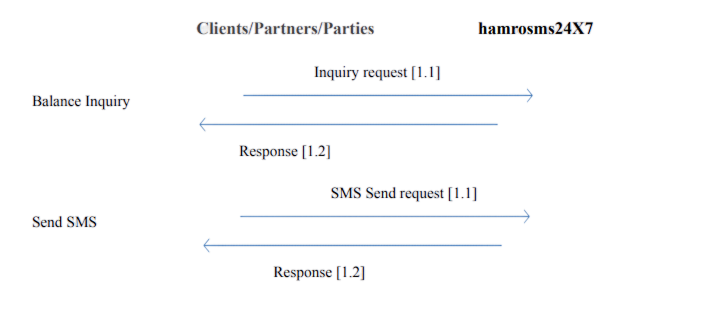
Fig1: System Interaction with partner/Client Server for balance enquiry and sms sending
The scenario visualized in above figure shows an overall communication from user's Server to SociairSMS and response back to the user's Server. Number in bracket specifies the order of process that is carried out between user and SociairSMS.
Integration
Before starting the integration, the party must be a registered user in sms.sociair.com. After registration, the party intending for SMS API integration will receive a unique token (note: it is a non–recoverable alphanumeric token which is generated only once). That means, the token once deleted/expired cannot be recovered; instead, a new token can be generated. With a unique token, the API integration can be initiated.
Balance Inquiry
The client/partner calls the Sociair SMS server with a unique token as in process 1.1 of Balance Inquiry shown in figure above. If the unique token is valid, response (1.2) is sent back to client/partner with the current balance in their account. If the token is invalid, an error message is sent from partner/client.
URL:
https://sms.sociair.com/api/balance
Request Method:
GET
Request Headers:
{
  "Authorization": "Bearer your_bearer_token",
  "Content-Type": "application/json",
  "Accept": "application/json"
}
Success Response
{
  "balance":"19.20",
  "ntc_rate": "0.80",
  "ncell_rate": "0.80",
  "smartcell_rate": "0.80",
}
Error Response
{
  "message":"Unauthenticated",
}
Send SMS to Single Mobile Number
URL:
https://sms.sociair.com/api/sms
Request Method:
POST
Request Headers:
{
  "Authorization": "Bearer your_bearer_token",
  "Content-Type": "application/json",
  "Accept": "application/json"
}
Request Body
{
  "message": "your_message",
  "mobile": "9840....."
}
Success Response
{
  "message":"Success! SMS has been sent",
  "ntc":1,
  "ncell":0,
  "smartcell":0
}
Error Response
{
  "message":"Unauthenticated",
} or
{
  "message":"Sorry! SMS could not be sent. Invalid mobile number",
  "ntc":1,
  "ncell":0,
  "smartcell":0,
  "other":1,
  "invalid_number":[
    "984956362"
  ]
}
Send SMS to Multiple Mobile Number
URL:
https://sms.sociair.com/api/sms
Request Method:
POST
Request Headers:
{
  "Authorization": "Bearer your_bearer_token",
  "Content-Type": "application/json",
  "Accept": "application/json"
}
Request Body
{
  "message": "your_message",
  "mobile": "984011111,980113333"
}
Success Response
{
  "message":"Success! SMS has been sent",
  "ntc":1,
  "ncell":0,
  "smartcell":0
}
Error Response
{
  "message":"Unauthenticated",
} or
{
  "message":"Sorry! SMS could not be sent. Invalid mobile number",
  "ntc":1,
  "ncell":0,
  "smartcell":0,
  "other":1,
  "invalid_number":[
    "984956362"
  ]
}